
Disclosure: LokalBot is our app. To keep this fair, we installed the latest release of every app on November 9, 2026, took every screenshot ourselves, and checked each claim against the project's own site, docs, license, and release notes, listed at the end. Nobody paid to be included. We re-check the page every month; if something is wrong or out of date, tell us on GitHub.
The short answer
These six tools all run AI on your own computer, but they do different jobs. Pick by what you want to do:
- A private ChatGPT-style chat app: Jan is open source and sets itself up in a few clicks. LM Studio is more polished, but its app is closed source.
- Models for other apps, scripts, and coding agents: Ollama.
- Answers from your documents: AnythingLLM.
- One ChatGPT-like web app for your household or team: Open WebUI, running on top of Ollama. Read its license first if you plan to rebrand it.
- An assistant that remembers your actual work, from meetings to what you saw on screen: LokalBot, our app.
They also work together. Most of them can use a model that Ollama or LM Studio is already serving, so you don't have to choose just one.
At a glance
Checked on November 9, 2026. Every app is free to use on your own computer.
| App | Best for | Runs models itself | Remembers you across chats | Chat with your files | License |
|---|---|---|---|---|---|
| Ollama | Running models for other apps and agents | Yes | No | Attaches a file's text to the prompt | MIT |
| LM Studio | Trying models in a polished app | Yes | No | PDF, Word, and text files | Proprietary, free |
| Jan | A simple private chat app | Yes | Not yet (“coming soon”) | Yes, with citations | Apache 2.0 |
| AnythingLLM | Chatting with documents | Yes, in the desktop app | Optional, off by default | Yes, workspaces with sources | MIT |
| Open WebUI | A shared web app for a household or team | No, connects to Ollama or an API | Yes, marked experimental | Yes, knowledge bases with citations | Open WebUI License (not OSI) |
| LokalBot | Remembering your meetings and screen | Yes, built in | Yes, learns from your own words | Searches folders you choose | GPLv3 |
Which one is a ChatGPT alternative with memory?
ChatGPT can remember details you share and use them in later chats. Of these six, three remember something about you, and they do it in very different ways:
- Open WebUI keeps memories under Settings → Personalization → Memory, marked Experimental. You can add them yourself, and with native tool calling the model can save them on its own. In our test with Qwen3.5 4B on Ollama, “Remember that I am vegetarian” got a friendly “I've noted that,” but nothing was saved. Memories we added by hand were used in the next chat. Its docs warn that memory works best with capable models.
- AnythingLLM added Memories & Personalization in May 2026. It's off by default. Once you turn it on, a background job reads recent chats every three hours and keeps up to 5 memories about you plus 20 per workspace, which you can edit. It needs a model that supports tool calling.
- LokalBot remembers your work rather than your chats: meeting transcripts, notes, and decisions, and, if you turn it on, what you saw on screen. Its Personal Context is an encrypted list of facts, preferences, and goals. It learns them overnight from your own words in meetings, never other speakers', or when you say “Remember …” in Ask. Every learned item shows the line it came from, and preferences wait for you to keep or dismiss them. Learning is on by default and one switch stops it.
- Jan lists memory as coming soon. Its projects share instructions and files across chats today.
- Ollama and LM Studio don't remember anything between chats.
Before you trust any assistant with memory, check what it saves, whether you can see and delete each item, and which model reads it. All of these keep memories on your own computer, but if you connect a cloud model, that model sees them too.
The six apps, one by one
In order from model runners to chat apps, with LokalBot last.
Ollama
The model runner other apps build on
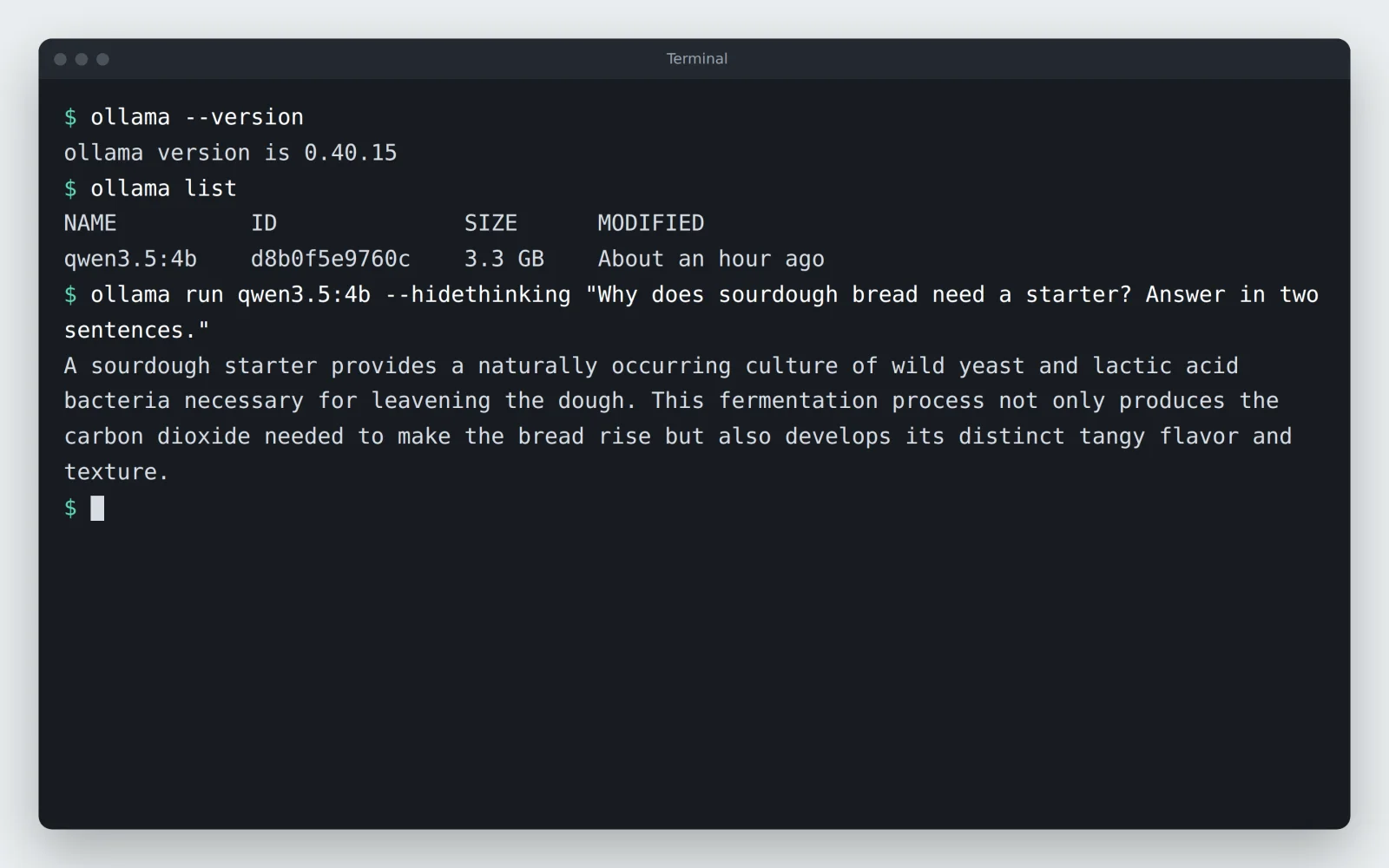
With about 186,000 GitHub stars, Ollama is the best-known way to run open models on your own computer. One command downloads a model and runs it, and a local API that speaks the OpenAI and Anthropic formats serves it to other apps. That API is why so many tools in this list, LokalBot included, can use Ollama as their engine. On macOS and Windows it also has a simple chat app with chat history, file attachments, and a thinking switch. On Linux it is command line only.
Good for
- Running models for other apps, scripts, and coding agents.
- A dependable local API with one-command model downloads.
Watch out for
- No memory between chats, and attached files are pasted into the prompt rather than indexed, so long files get cut off. Unless your GPU has 24 GB or more, the default context is 4,096 tokens.
- Cloud models and web search are on by default, and using them needs an Ollama account. Set
OLLAMA_NO_CLOUD=1to turn them off.
- Latest release
- 0.40.15, November 3, 2026
- License
- MIT, app included
- Runs on
- macOS 14+, Windows 10+, Linux (command line only), Docker
- Price
- Free on your own hardware; optional cloud plans from $20 a month
- Source
- github.com/ollama/ollama · about 186k stars
# macOS and Linux
$ curl -fsSL https://ollama.com/install.sh | sh
# then download and chat with a model
$ ollama run qwen3.5:4b
LM Studio
The polished desktop app for trying models
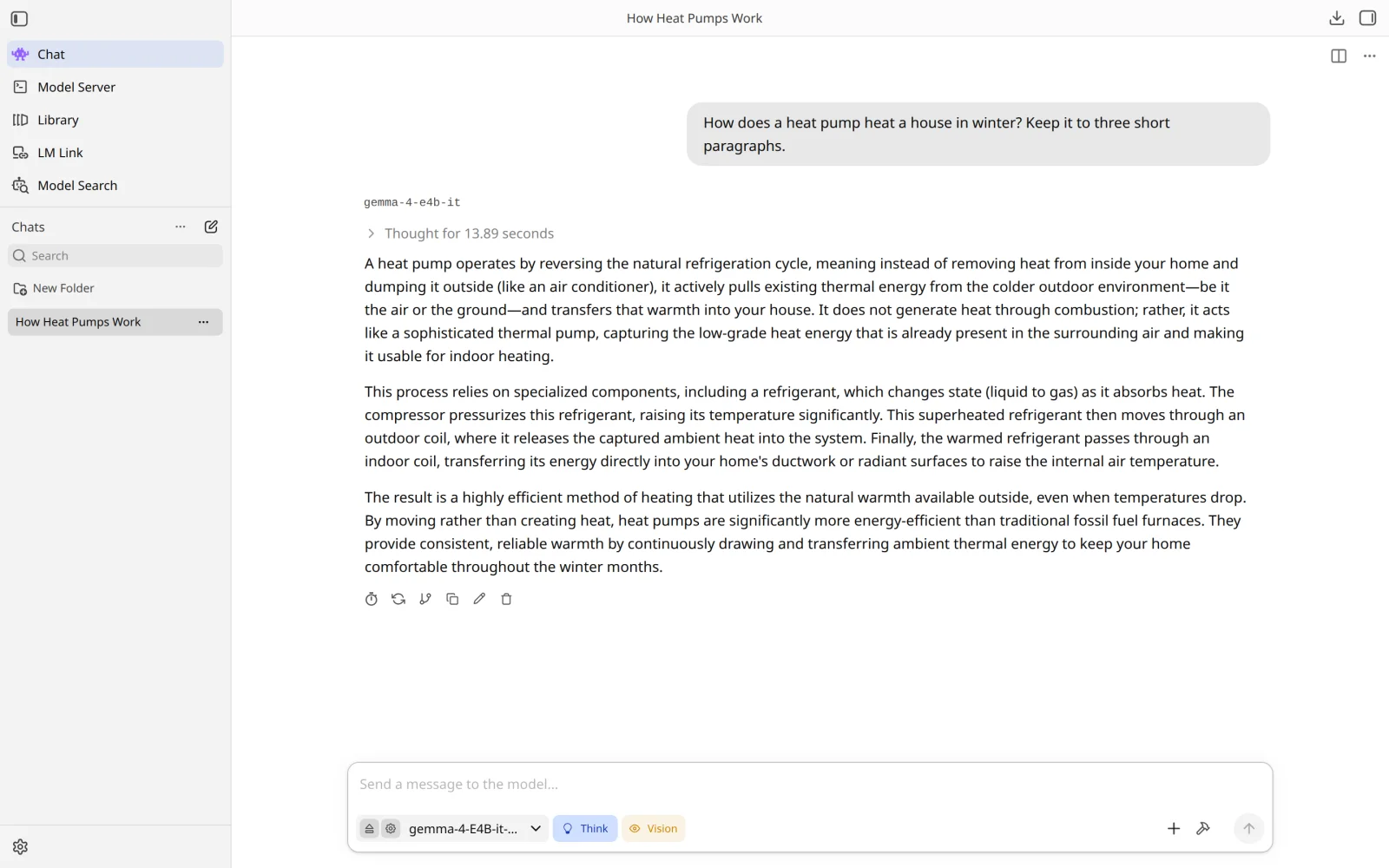
LM Studio is a desktop app for finding, downloading, and running models from Hugging Face. It has a clean chat window, chat with documents, MCP tools, and a local server that speaks the OpenAI and Anthropic formats. It runs llama.cpp everywhere and Apple's MLX on Apple Silicon. Of the apps here, it's the nicest for trying and comparing models.
It is not open source. The app is proprietary, though free for home and work since July 2025. Its lms command-line tool, SDKs, and MLX engine are MIT-licensed. We include it because it's one of the most common answers to “how do I run AI locally?”
Good for
- Trying and comparing models from Hugging Face.
- Serving a model to other apps from a desktop app instead of the command line.
Watch out for
- Closed source, and it remembers nothing between chats: its docs say the model only knows what's in the chat or the system prompt.
- Document chat reads PDF, Word, and text files. Voice input and web search aren't in LM Studio; the company's new agent app, LM Studio Bionic, has them, partly on paid plans.
- Intel Macs aren't supported.
- Latest release
- 0.4.28, October 31, 2026
- License
- Proprietary (app terms), free for home and work; CLI and SDKs MIT
- Runs on
- macOS 14+ on Apple Silicon, Windows (x64 and Arm), Linux (x64 and Arm AppImage)
- Price
- Free
- Source
- App not public; CLI and SDKs on GitHub
Jan
The open-source ChatGPT-style desktop app
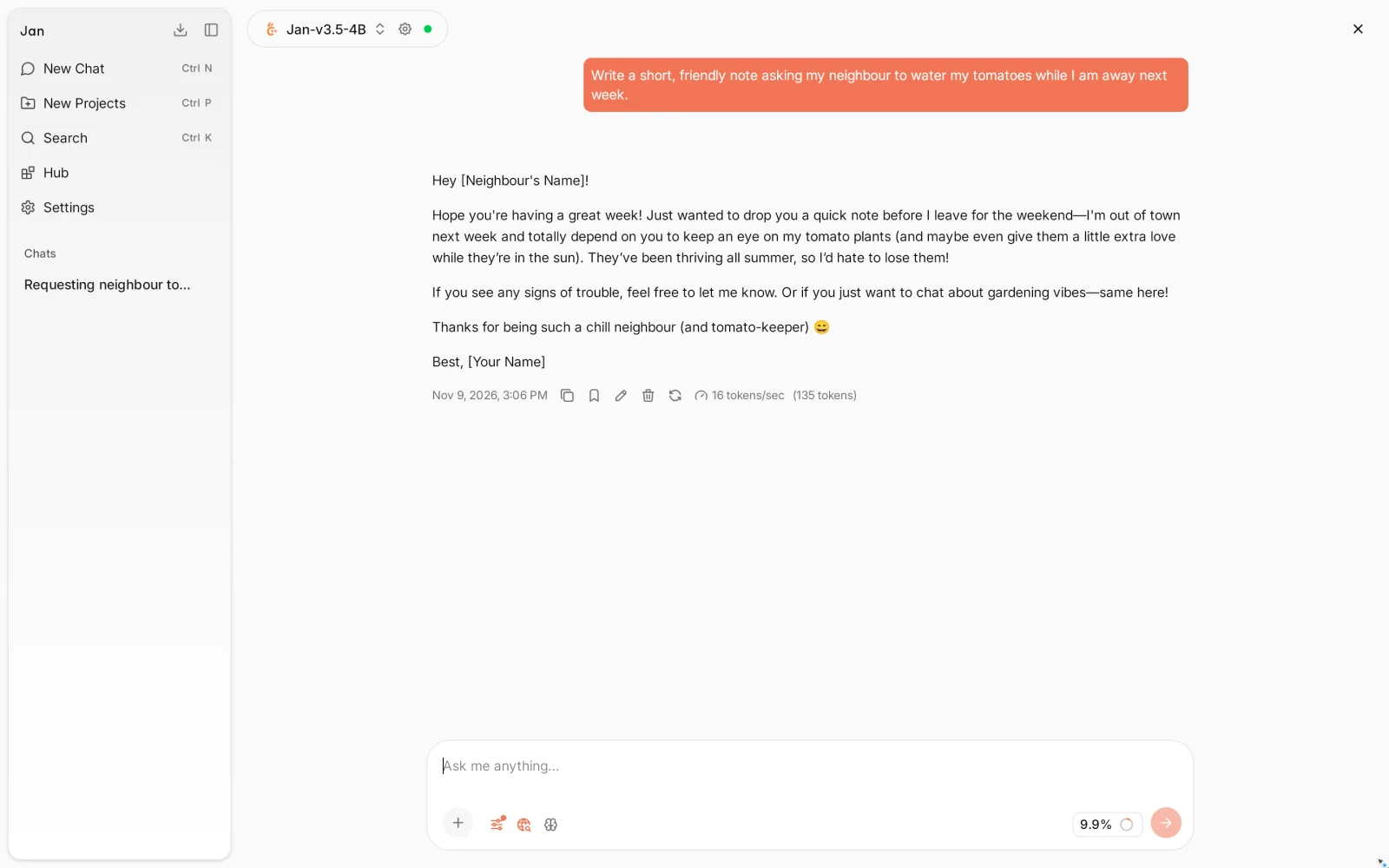
Jan is the open-source app that feels closest to ChatGPT: install it, let it download a recommended model, and start typing. It bundles llama.cpp, can also use cloud models with your own API keys, and has projects, chat with files with citations, MCP tools, web search, and an OpenAI-compatible local server. Analytics stay off unless you allow them during setup.
Good for
- A simple, open-source private chat app.
- Using local and cloud models side by side in one window.
Watch out for
- No memory yet: Jan's site lists it as “coming soon”. Projects share instructions and files across chats in the meantime.
- Web search is on by default and sends your query to Exa when the model decides to search. On Intel Macs, Jan only works with cloud models.
- Jan published 11 security advisories on October 29, 2026, two of them critical. Use version 0.8.8 or later.
- Latest release
- 0.8.8, October 28, 2026
- License
- Apache 2.0 since May 2025 (AGPLv3 before)
- Runs on
- macOS 13.6+ (Apple Silicon for local models), Windows 10+, Linux (x64)
- Price
- Free
- Source
- github.com/janhq/jan · about 45.6k stars
# Linux, from Flathub
$ flatpak install flathub ai.jan.Jan
AnythingLLM
The app for chatting with your documents
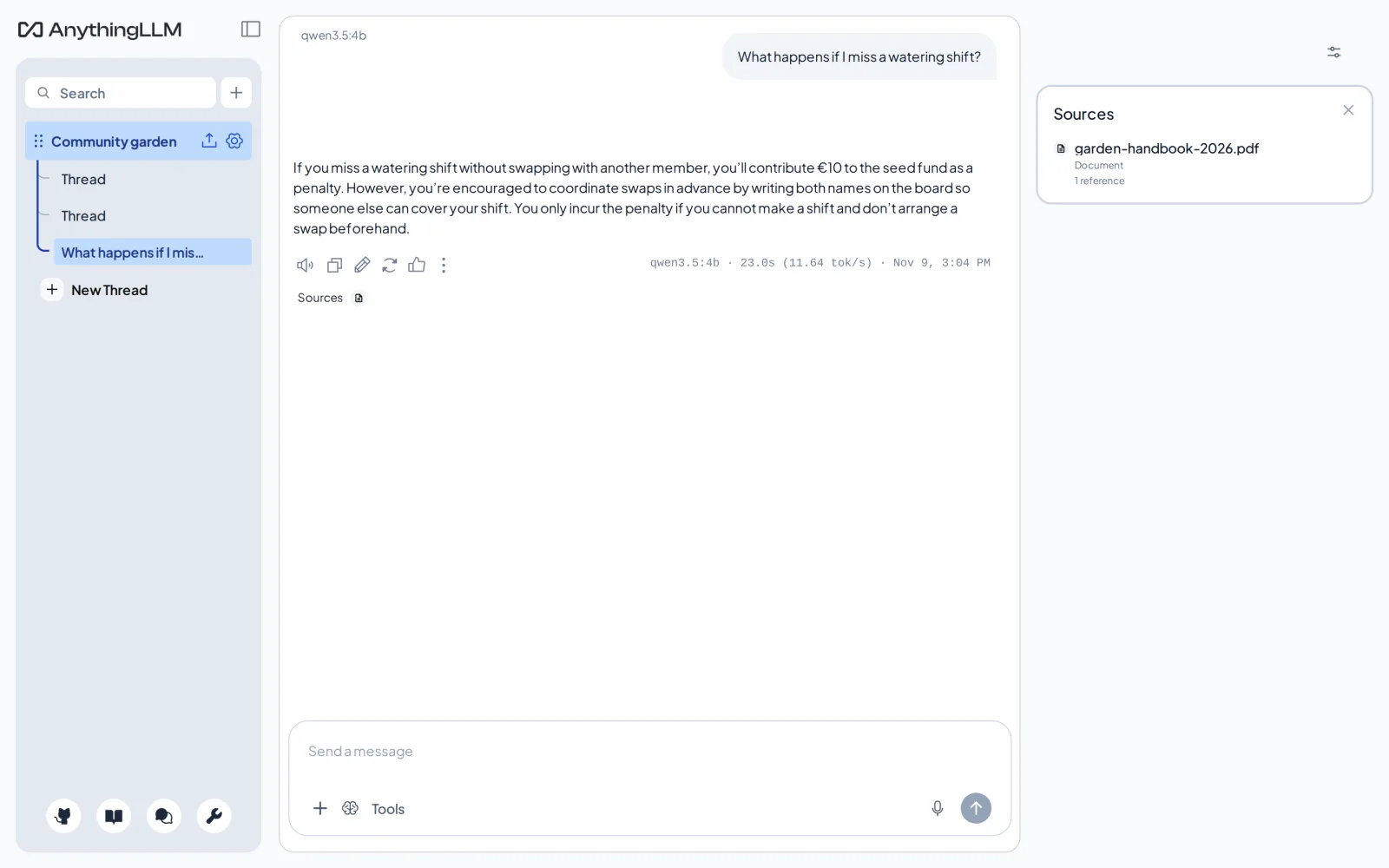
AnythingLLM is built around workspaces of documents. Add PDFs, Word files, spreadsheets, web pages, or a GitHub repository, then ask questions and see the sources under each answer. It also has agents that browse the web and run scheduled jobs, MCP tools, voice input, and, in the desktop app for macOS and Windows, a meeting assistant that transcribes calls on your computer. The desktop app is single-user and has its own llama.cpp engine. The Docker version adds user accounts and an embeddable chat widget.
Good for
- Asking questions across a pile of documents, with sources.
- Small teams sharing document workspaces on one server.
Watch out for
- Anonymous usage telemetry is on by default. Turn it off under Privacy, or with
DISABLE_TELEMETRY=trueon Docker. - Some desktop features, such as the meeting assistant and the Magic dictation and autocomplete tools, aren't in the public repository, and unlimited use of the Magic tools needs a paid Pro license.
- Agent web search goes to You.com by default.
- Latest release
- 1.19.0, October 26, 2026
- License
- MIT
- Runs on
- macOS, Windows, Linux (AppImage), Docker; an Android app
- Price
- Free; hosted cloud from $50 a month
- Source
- github.com/Mintplex-Labs/anything-llm · about 68k stars
# Docker, for several users; then open http://localhost:3001
$ export STORAGE_LOCATION=$HOME/anythingllm && mkdir -p $STORAGE_LOCATION && touch "$STORAGE_LOCATION/.env"
$ docker run -d -p 3001:3001 --cap-add SYS_ADMIN \
  -v ${STORAGE_LOCATION}:/app/server/storage \
  -v ${STORAGE_LOCATION}/.env:/app/server/.env \
  -e STORAGE_DIR="/app/server/storage" mintplexlabs/anythingllm
Open WebUI
The self-hosted ChatGPT for a household or team
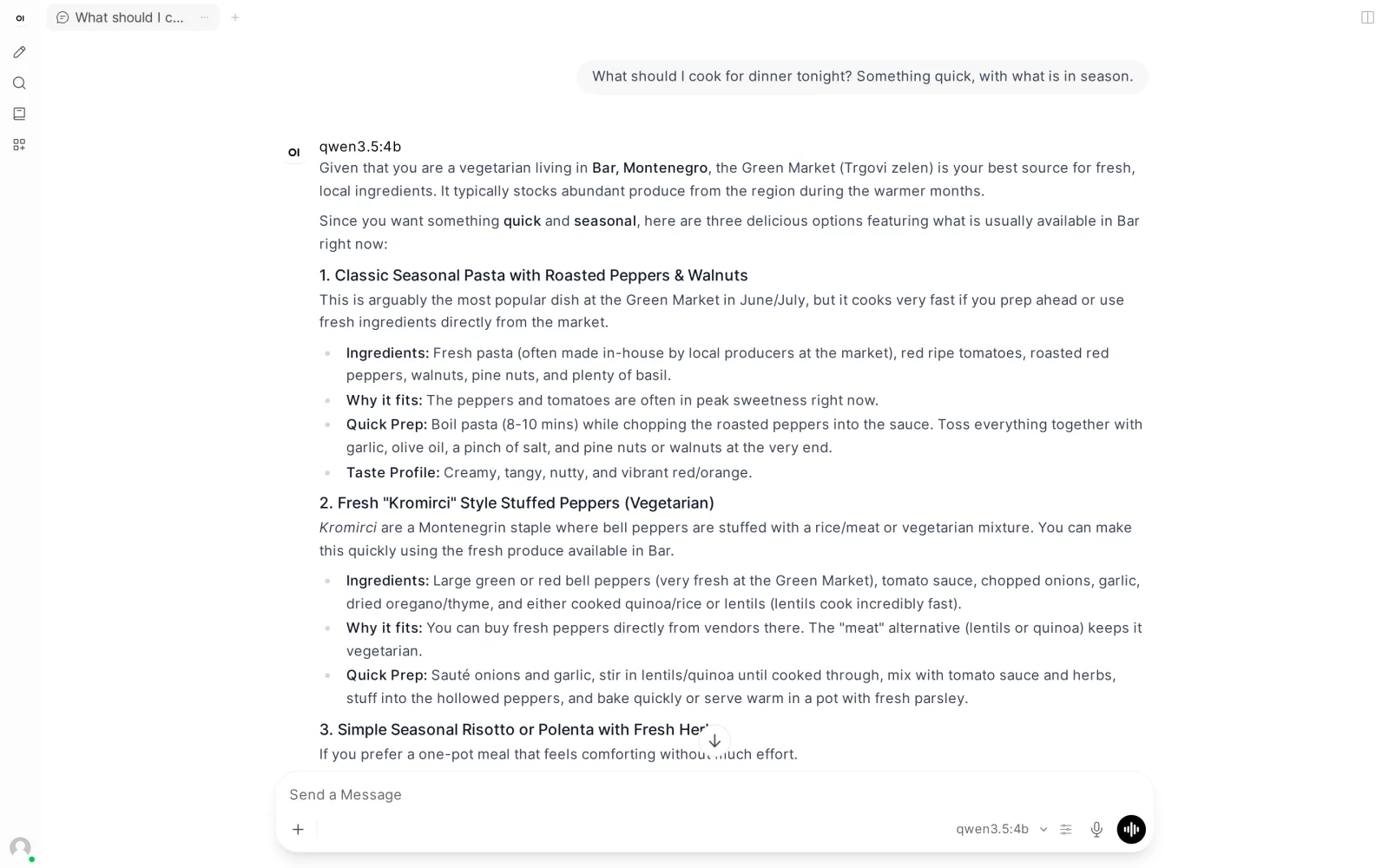
Open WebUI is a self-hosted, ChatGPT-style web app. You run it as a server with Docker or Python, connect it to Ollama or any OpenAI-compatible API, and open it in a browser on any device, including as an installable app on your phone. It has the longest feature list here: accounts and groups, knowledge bases with citations, web search, memory, voice calls with local Whisper transcription, image generation, tools, and MCP.
Good for
- One private ChatGPT-like web app for several people.
- Power users who want every feature and don't mind running a server.
Watch out for
- It doesn't run models itself; you need Ollama or another server beside it. A new desktop app (0.1.4, AGPLv3) can run both on one computer.
- Since version 0.6.6 (April 2025) the Open WebUI License adds a branding clause to BSD-3 terms: above 50 users you may not remove the Open WebUI branding without an enterprise license. Its own docs say it is not an OSI-approved open-source license.
- It's a server to keep updated: there were four releases between November 3 and 8, 2026, and security fixes ship often. With a small model, its built-in tools can pull answers off topic.
- Latest release
- 0.13.3, November 8, 2026
- License
- Open WebUI License (BSD-3 plus a branding clause)
- Runs on
- Any OS with Docker or Python 3.11–3.12; a desktop app for macOS, Windows, and Linux
- Price
- Free; enterprise license for rebranding and support
- Source
- github.com/open-webui/open-webui · about 158k stars
# Docker, with Ollama on the same computer; then open http://localhost:3000
$ docker run -d -p 3000:8080 --add-host=host.docker.internal:host-gateway \
  -v open-webui:/app/backend/data --name open-webui --restart always ghcr.io/open-webui/open-webui:main
# or with Python 3.11 or 3.12
$ pip install open-webui && open-webui serve
LokalBot
Our app: an assistant that remembers your work
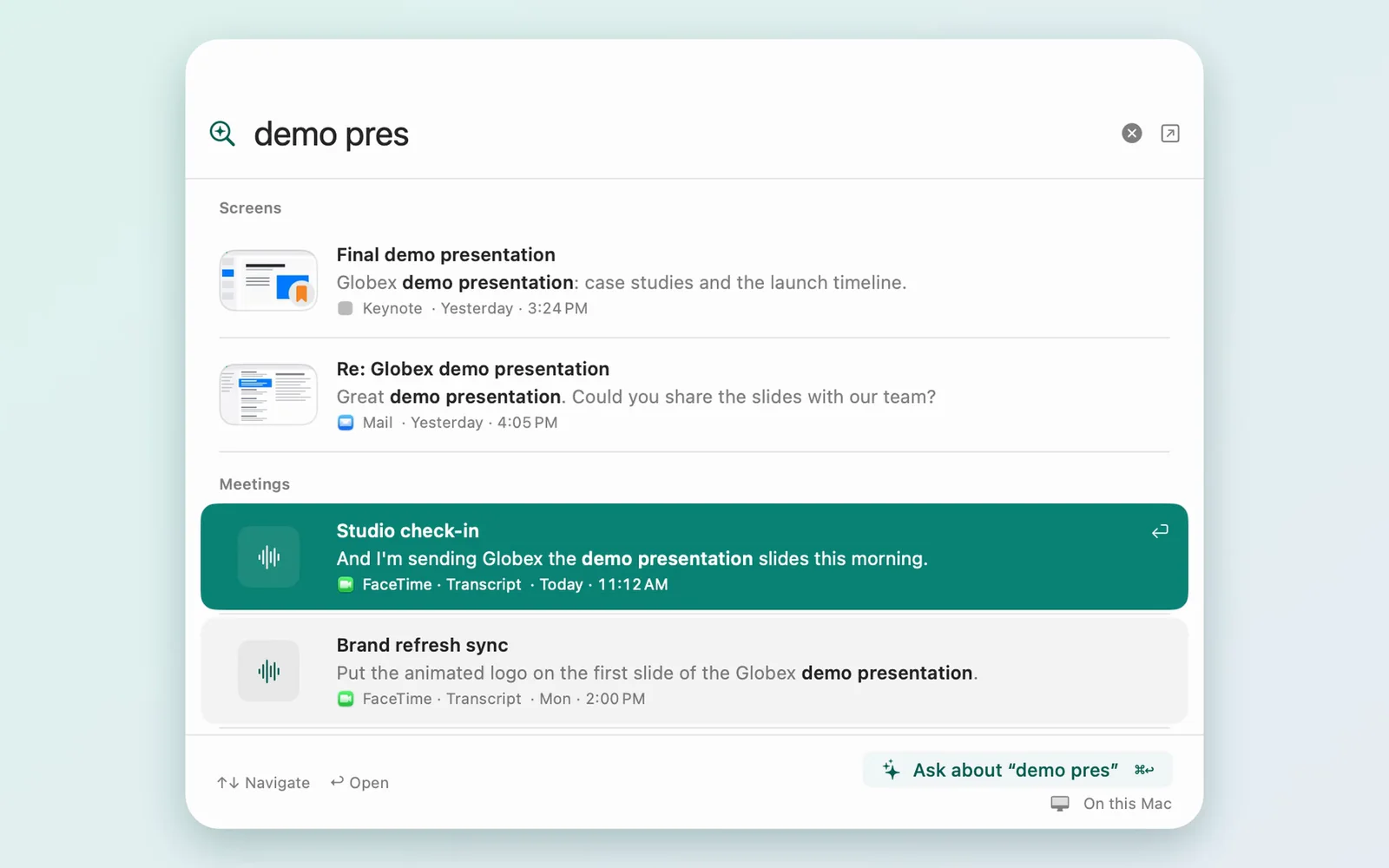
LokalBot is our app, and it's a different kind of assistant. Instead of starting from an empty chat, it builds a memory of your work. It records meetings without a bot joining, transcribes and summarizes them on your computer, and, if you turn it on, keeps the text of what you saw on screen. Ask a question and the answer cites the meeting or screen moment it came from. It also has dictation, autocomplete in other apps, a search of folders you choose, and a read-only MCP server, off until you turn it on, so Claude Code or Codex can search your library. Its models are built in; you can also point it at Ollama or another OpenAI-compatible server.
Good for
- Remembering what was said and decided in meetings, and finding something you saw.
- Giving coding agents your context, read-only.
Watch out for
- It isn't a general chat app for trying models; pair it with one of the apps above for that.
- Recording needs your colleagues' consent, and screen memory and dictation need system permissions.
- It's best on a Mac. The Windows and Linux app is in alpha, and LokalBot is a small project built by one developer.
- Latest release
- 0.12.2, November 5, 2026
- License
- GPLv3
- Runs on
- macOS 15+ on Apple Silicon; Windows 10/11 and Linux in alpha (requirements)
- Price
- Free, no account
- Source
- github.com/stevyhacker/lokalbot · 91 stars
# Mac, with Homebrew
$ brew install --cask stevyhacker/tap/lokalbot
Use them together
A common setup is one app that runs the model and another that you talk to:
- Open WebUI and AnythingLLM both connect to Ollama out of the box, and to LM Studio's server as an OpenAI-compatible API.
- Jan can add Ollama or LM Studio as a custom OpenAI-compatible provider.
- LokalBot can use Ollama or any OpenAI-compatible server, such as LM Studio's or Jan's, in Settings → Models. A server on another computer has to be approved before it receives any of your context.
How we tested
On November 9, 2026, we installed the latest release of each app on a Linux test machine with an 8-core AMD Ryzen 7 9700X, 64 GB of memory, and no GPU, so every model ran on the CPU. LM Studio and Jan used the model each one suggests on first run: Gemma 4 E4B and Jan-v3.5-4B. Open WebUI and AnythingLLM used Qwen3.5 4B served by Ollama, as did Ollama itself. We kept each app's default settings, except that we declined Jan's analytics prompt and added two memories in Open WebUI by hand. In Open WebUI, the 4B model kept reaching for the built-in automation tools, and with thinking on it once thought for four minutes without answering, so the screenshot's chat uses Legacy tool calling with thinking off. LokalBot's screenshot comes from its Mac app with fictional demo data. The handbook and the questions are made up too.
A 4B model on a CPU is a modest setup: answers arrived at about 12 to 20 tokens a second. With a GPU or an Apple Silicon Mac, every one of these apps is faster and can run larger models, which also follow instructions and use memory more reliably.
Update log
- : First published. Checked Ollama 0.40.15, LM Studio 0.4.28, Jan 0.8.8, AnythingLLM 1.19.0, Open WebUI 0.13.3, and LokalBot 0.12.2.
Sources
Each project's own pages, checked on November 9, 2026:
- Ollama: github.com/ollama/ollama/releases, docs.ollama.com/faq, docs.ollama.com/context-length, ollama.com/pricing
- LM Studio: lmstudio.ai/changelog/lmstudio, lmstudio.ai/app-terms, lmstudio.ai/blog/free-for-work, lmstudio.ai/docs/app/system-requirements, lmstudio.ai/docs/app/basics/chat, lmstudio.ai/docs/app/basics/rag
- Jan: github.com/janhq/jan/releases, jan.ai/, docs.jan.ai/desktop/privacy, docs.jan.ai/desktop/web-search, github.com/janhq/jan/security/advisories
- AnythingLLM: github.com/Mintplex-Labs/anything-llm/releases, docs.anythingllm.com/installation-docker/overview, docs.anythingllm.com/features/memories, github.com/Mintplex-Labs/anything-llm#telemetry--privacy, anythingllm.com/cloud
- Open WebUI: github.com/open-webui/open-webui/releases, docs.openwebui.com/license, docs.openwebui.com/features/chat-conversations/memory, docs.openwebui.com/getting-started/quick-start, github.com/open-webui/desktop/releases
LokalBot's facts come from its README and privacy policy. If this comparison helped you, a star on GitHub is how other people find LokalBot. Trademarks belong to their owners.